RoleLead Product Designer
FeaturesBracket Challenge · Game Switcher
PlatformsMobile · Web · Connected TV
OrganizationTurner Sports / NCAA
Scale10.8M Live Uniques

Designing the live tournament
experience for millions of fans
across every screen.

As lead product designer for March Madness Live, I shaped the cross-platform experience for one of the most watched sporting events in the country. My focus was the Bracket Challenge fueling fan engagement through real-time predictions, the Game Switcher, and enabling seamless transitions between simultaneous games. Both features had to work flawlessly across mobile, web, and connected TV, each with its own interaction model, latency constraints, and audience behavior.

10.8M
Live Uniques
Tournament-to-Date
↑ 14% year-over-year
97.9M
Live Streams
Tournament-to-Date
↑ 33% year-over-year
874.9K
Peak Concurrent Users
Championship Night
↑ 27% year-over-year
March Madness Live hero

Add hero image — in-game live view across platforms

One tournament. Three completely different design problems.

March Madness runs for three weeks, peaks at 67 simultaneous games, and serves fans who expect real-time updates, zero lag, and the freedom to jump between streams mid-play. Designing for that is already hard. Designing it across mobile, web, and connected TV simultaneously — where each platform has a different interaction model, different hardware constraints, and a different user posture — is a systems design challenge at scale.

The Bracket Challenge and Game Switcher were the two features that made or broke the digital experience. Get them right and fans stay engaged. Get them wrong and they switch to a competitor or just watch TV.
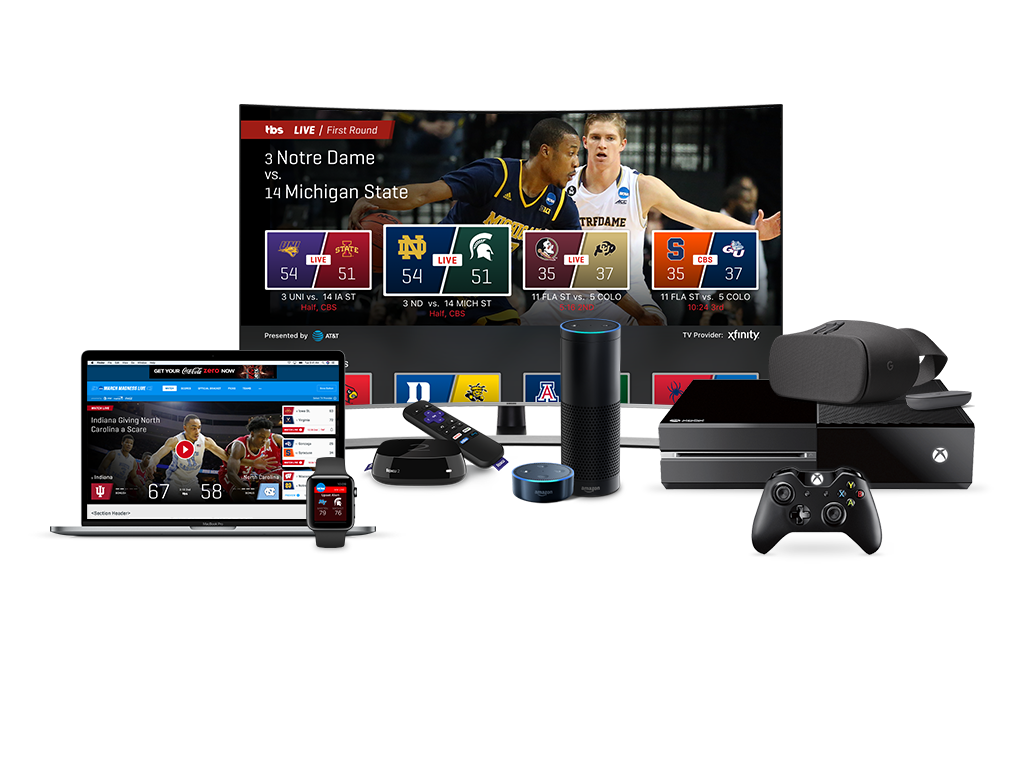
March Madness Live across mobile, web, and connected TV

Four fan types. One experience.

Segment 01
Bracket Participants
Monitor picks and standings in real time throughout the tournament
See upsets immediately and understand how they affect their bracket
Compare standings against group pool members
Return multiple times daily during first-round play
Segment 02
Multi-Game Viewers
Switch between 4+ simultaneous live streams without friction
Know instantly what's happening in other games without leaving the current stream
Jump to a game at a critical moment — buzzer beaters, upsets
Minimal UI interruption while watching
Segment 03
Casual / Mobile Fans
Check scores quickly during work hours or on the go
Watch highlight clips without committing to a full stream
Track how their alma mater is performing
Low-friction entry — they're not power users
Segment 04
Cord-Cutters / CTV
Watch all games live without a cable subscription
Navigate with a remote — no touch, no mouse
High reliability and minimal buffering on a TV screen
Full tournament access equivalent to cable

Same features. Completely different implementations.

The Bracket Challenge and Game Switcher had to work across three platforms — each with its own posture, input method, and performance envelope. A single design system provided shared tokens and brand consistency. Everything else was platform-specific.

Primary Platform · 53% of Uniques
Mobile — iOS & Android
The majority platform. Users are on the move, often second-screening alongside a TV. Speed and glanceability are everything.
Floating action button replaced the tab bar — persistent navigation without taking screen real estate from the live video feed
Game Switcher surfaced as a bottom sheet overlay, not a separate screen
Bracket Challenge optimized for vertical scrolling and tap — no hover states, no complex drag
Real-time score badges updated without full view refreshes
Rich Platform · 44% of Uniques
Web — Desktop & Tablet
The most data-rich context. Users have more screen space, more time, and expect a deeper experience with full tournament context alongside the stream.
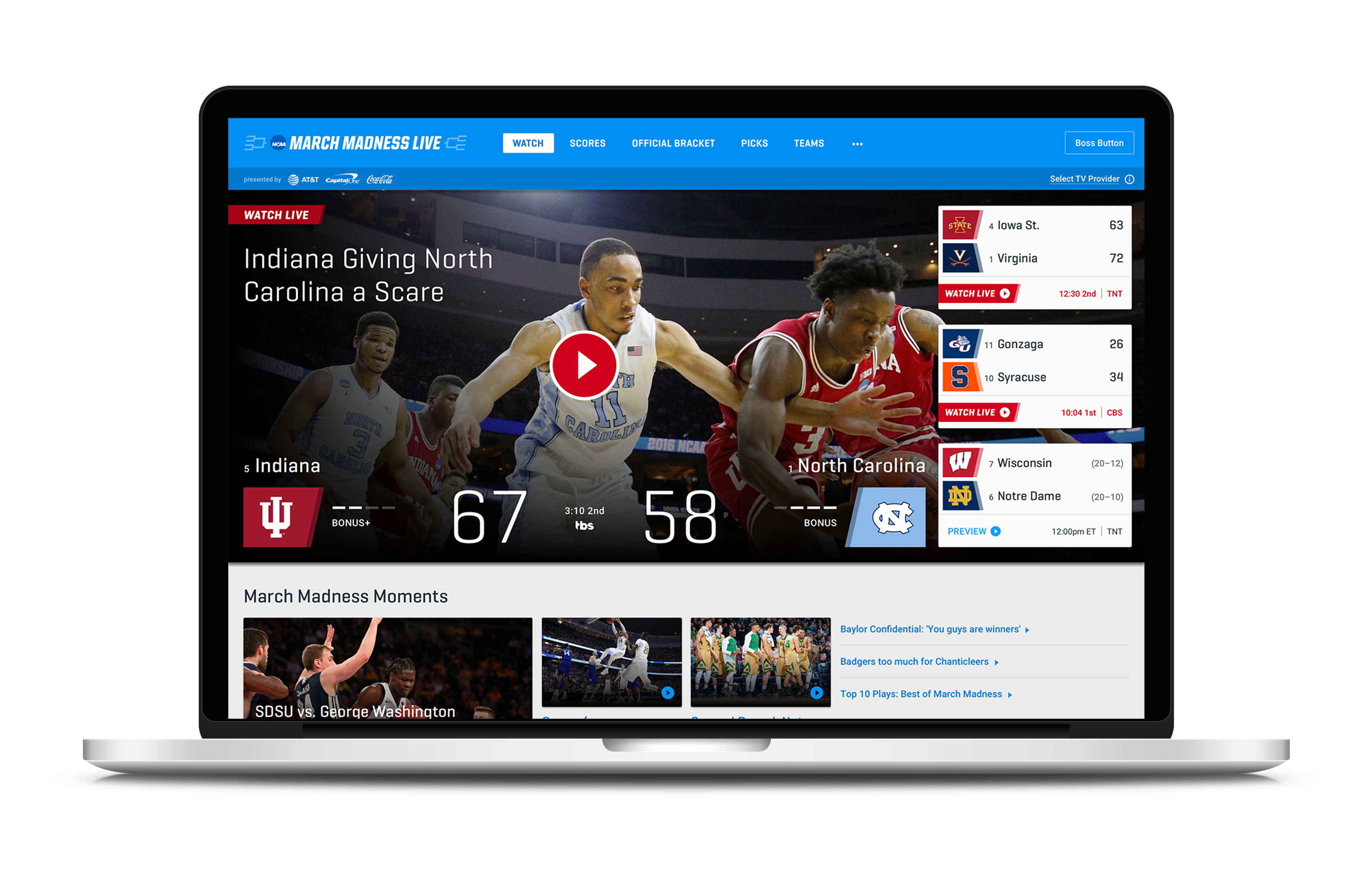
Multi-game grid view — 4 simultaneous streams visible at once with the Game Switcher
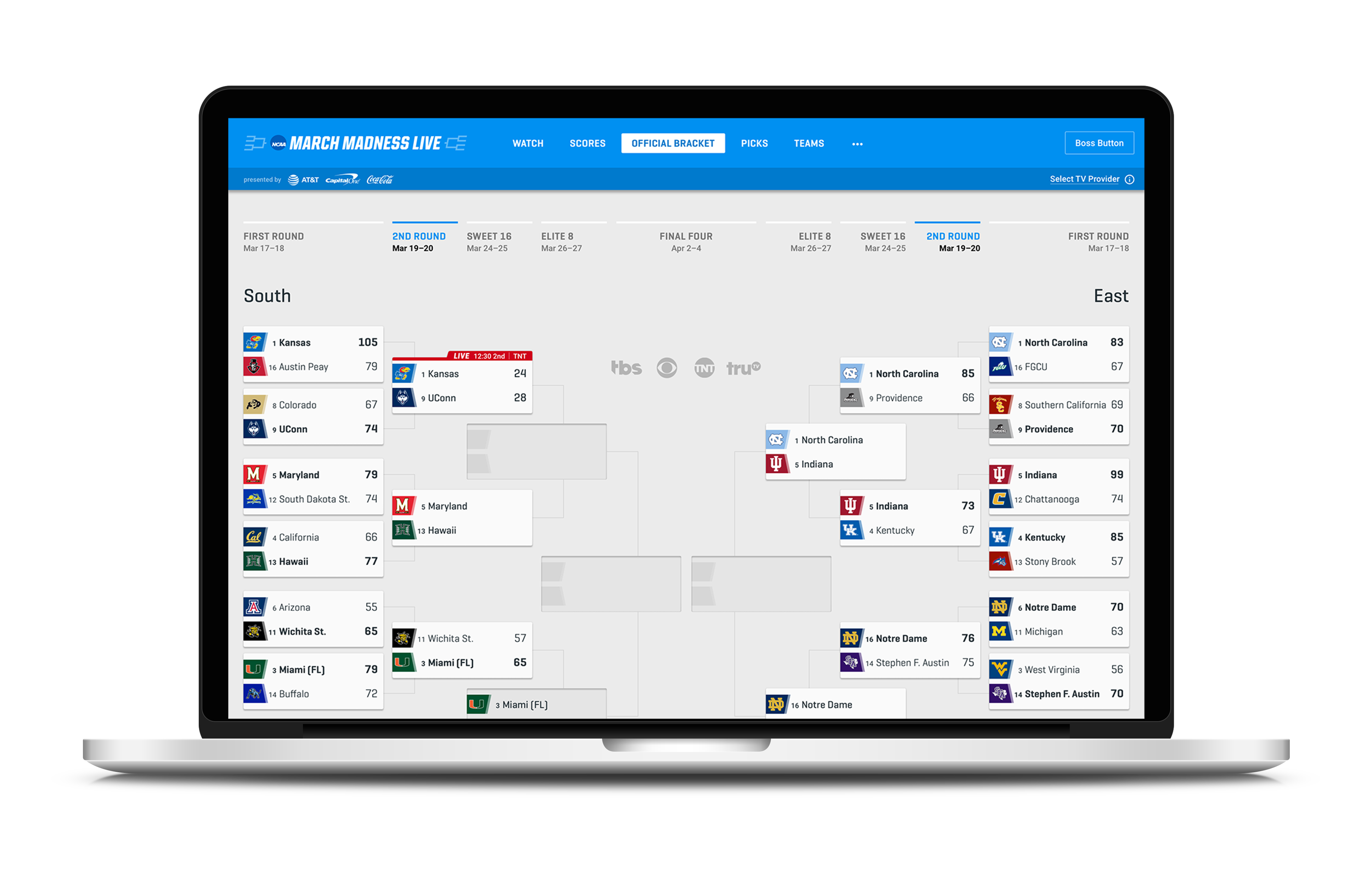
Bracket Challenge displayed full tournament tree, not paginated mobile view
Hover states and tooltips added contextual score data without cluttering the default view
Performance-first layout — heavy data loads during peak traffic required careful component prioritization
Fastest Growing · ↑ 121% Uniques
Connected TV — Apple TV, Roku, Fire
The fastest-growing platform. Users are leaned back, using a remote, 10 feet from the screen. Every interaction has to work with d-pad navigation.
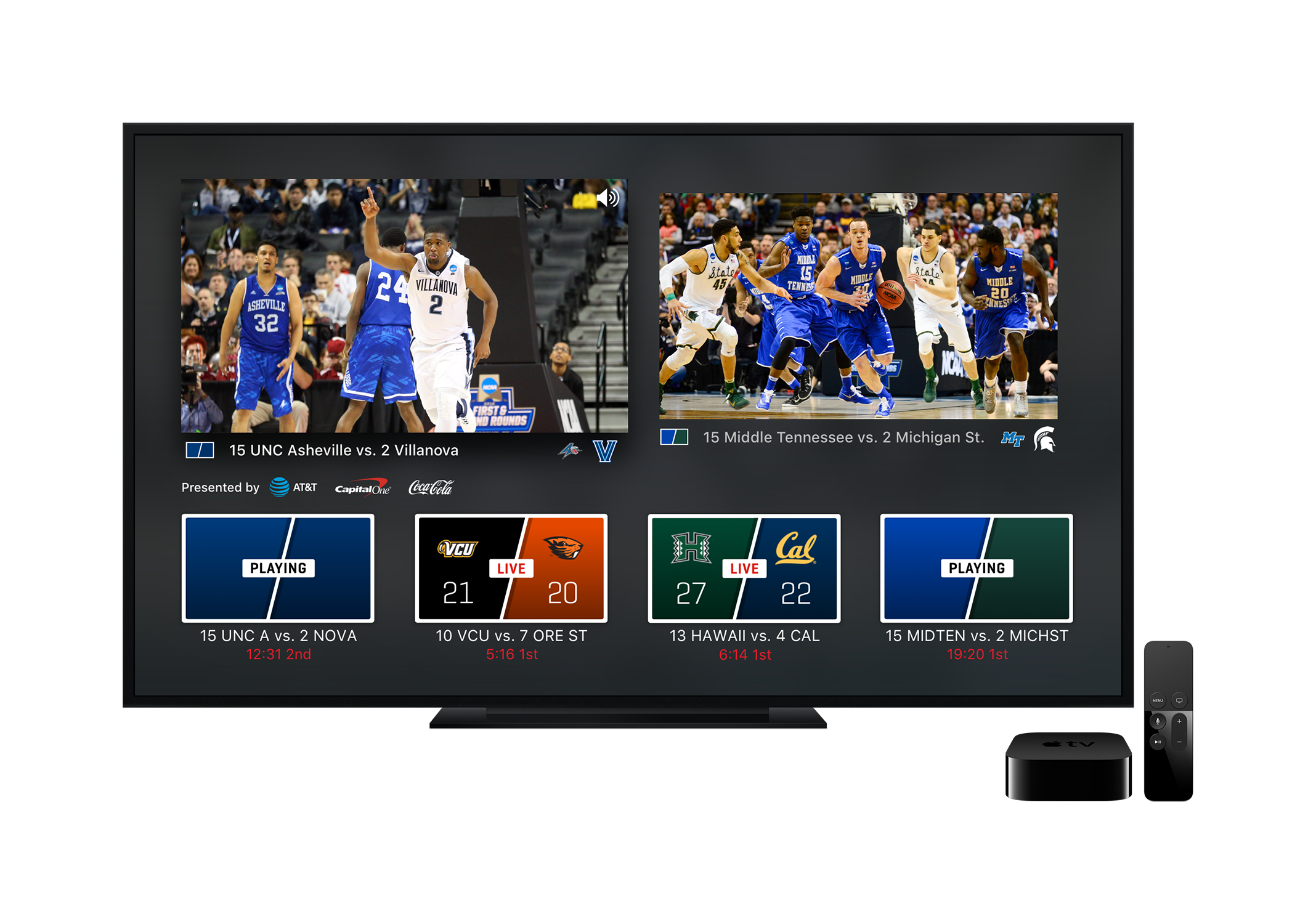
Game Switcher redesigned for remote-first navigation — directional focus states, no hover
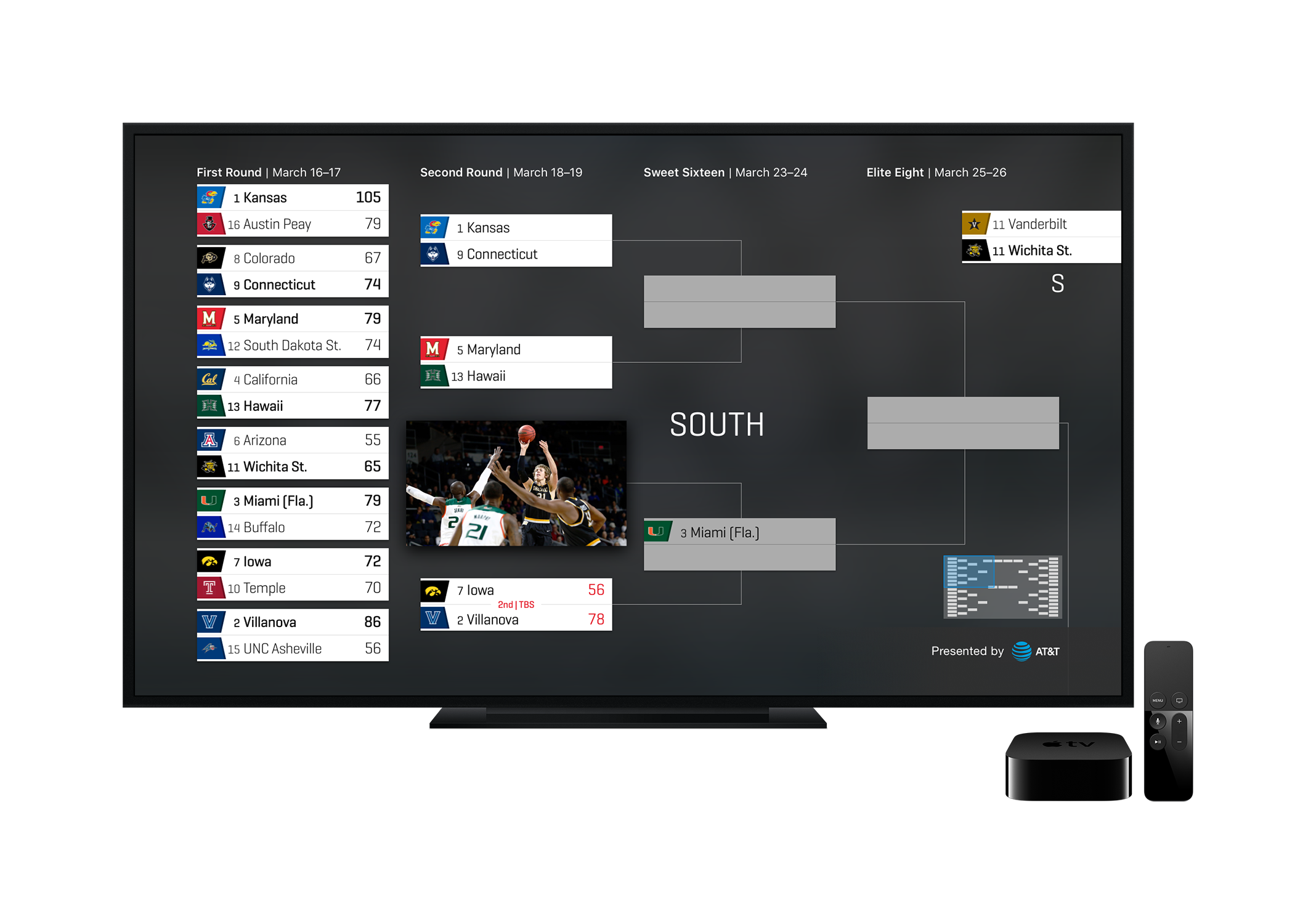
Bracket Challenge simplified to a focused view — full tournament tree doesn't translate to a TV at 10 feet
Target sizes and focus rings designed for TV display resolutions and viewing distance
No keyboard input — all navigation through directional pad and select button

The feature that brings fans back every day.

The Bracket Challenge is the primary engagement driver for March Madness Live. Fans fill out predictions before the tournament starts and return constantly to track how their picks are performing. The design challenge: real-time updates to a 67-game bracket need to feel immediate without creating anxiety-inducing visual chaos. Wins, upsets, and eliminations all communicate differently depending on whether it's your pick or a rival's.
01
Bracket Challenge
Mobile · Web · Connected TV · Real-time predictions & standings
Bracket mobile
Mobile
Bracket — Vertical Scroll View
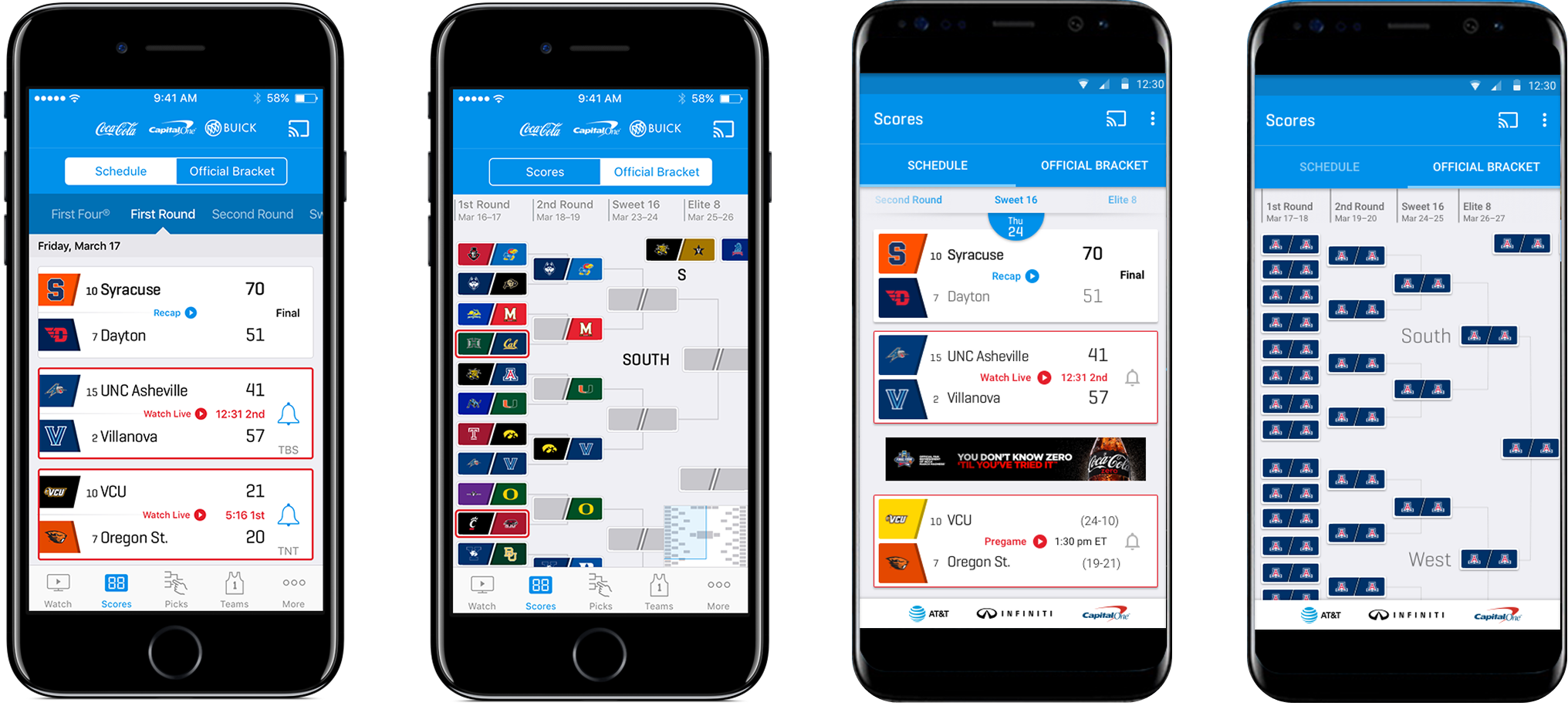
Paginated round-by-round view on mobile. Each matchup is a tappable card. Live score overlays update in-place. Wins highlighted in user's pick color; upsets flagged.
Design Rationale
Vertical scroll — not the horizontal bracket
The horizontal tournament bracket is the mental model fans know. But at phone scale, a 67-game horizontal tree becomes unnavigable. The paginated vertical view trades overview for usability — each round is a focused, scrollable list of matchups with live status.
Live score badges update in-place — no full-screen refresh
User's picks highlighted via color to surface upsets instantly
Scroll state persists between sessions — picks stay visible
Bracket web
Web
Bracket — Full Tournament Tree
All 67 games visible simultaneously on desktop. Bracket flows left to right. Real-time score badges on each matchup. Hover reveals pick accuracy and point standing.
Bracket CTV
Connected TV
Bracket — Focused CTV View
Simplified for 10-foot viewing. Current round foregrounded with d-pad navigation between matchups. Full tree not visible — focus ring always clear, type size increased for legibility.

Jump to the right game before the moment is over.

During the first round of March Madness, up to four games air simultaneously across TBS, TNT, TruTV, and CBS. The Game Switcher is the feature that lets fans follow the tournament instead of a single game — jumping to a buzzer beater in progress, catching an upset in the final minute, or monitoring three games at once. Every second of latency in the switching experience is a missed moment.
02
Game Switcher
Mobile · Web · Connected TV · Real-time stream navigation
Bracket mobile
Mobile
Game Switcher — Bottom Sheet
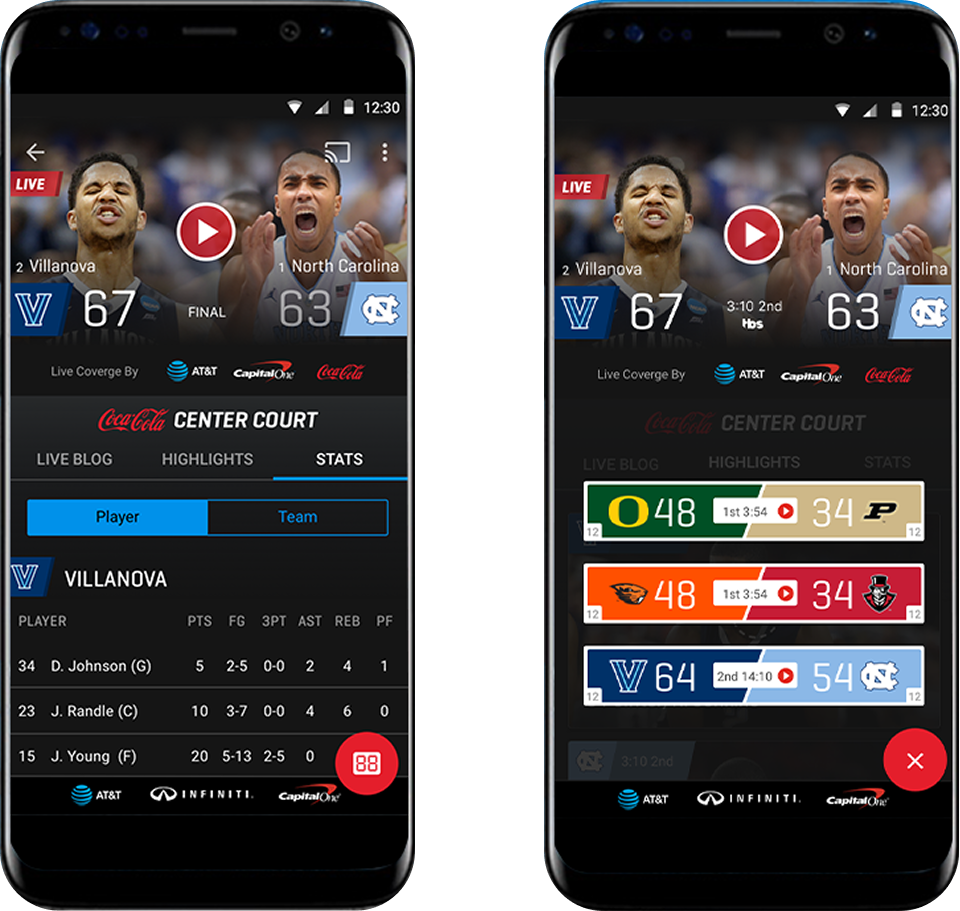
Slides up over the current stream. Current game at top, live thumbnail previews of other games below. Score, teams, period, and channel displayed per card. One tap switches.
Design Rationale
Bottom sheet — not a separate screen
Navigation away from the live stream is a dead end — users lose the video context and have to re-establish it. The bottom sheet keeps the stream playing behind the overlay. Users can see game cards and switch without ever experiencing dead air.
Stream plays behind the sheet — no dead air during navigation
Swipe to dismiss — zero extra taps to return to full-screen
Score, teams, period, and channel visible per card without opening
Game Swithcer
Web
Game Switcher — Multi-Stream Grid
Primary game large left. Three additional live previews in a right column. Click any preview to make it primary. All four games playing simultaneously — audio follows focus.
Game Switcher
Connected TV
Game Switcher — Remote Navigation
Triggered via remote. Game cards in a horizontal strip at the bottom of the full-screen stream. D-pad navigates left/right through games. Select confirms switch. Focus ring always visible.

Designed for a deadline that never moves.

01
Fan Behavior Analytics
Analyzed prior-year Adobe Analytics and Conviva data to understand platform split, peak concurrency patterns, session length, and where users dropped off. Data drove platform prioritization.
Research
02
Platform-Specific Design
Designed each feature three times — once per platform. Mobile-first, then web, then CTV. Each required a distinct interaction model while sharing brand tokens and information architecture.
Design
03
Usability Testing
Tested with bracket participants, multi-game viewers, and CTV users specifically. Remote control navigation testing for the set-top box experience surfaced interaction issues that touch testing missed entirely.
Validation
04
Tournament-Ready Launch
Hard launch window tied to Selection Sunday. No phased rollout. Coordinated handoff with engineering teams across mobile, web, and CTV simultaneously with full QA against live streaming infrastructure.
Launch

The tradeoffs that shaped the experience.

01
FAB over tab bar on mobile
The tab bar is a familiar navigation pattern — but on a live sports app, it steals vertical space from video and forces users out of the full-screen stream to switch sections. The floating action button keeps video full-screen and brings navigation to the user, not the other way around. It behaves like a native Android pattern so it doesn't require relearning.
TradeoffDiscoverability risk — FABs require users to know to tap them. Mitigated with an introductory animation on first launch.
02
Simplified bracket view on CTV
The full 67-game tournament bracket is a complex visual object that works at desktop scale but becomes unreadable at 10 feet on a TV screen. Rather than scaling the same component, I designed a focused CTV-specific bracket view that shows the current round with clear d-pad navigation. Depth is traded for legibility and navigability.
TradeoffCTV users lose the full bracket overview available on web. Framed as a platform-appropriate experience, not a missing feature.
03
Multi-stream grid on web only
Watching four simultaneous games requires enough screen real estate and processing power to render four video streams. This is only viable on desktop web. Rather than compromising the feature across platforms, I designed the full multi-stream grid for web and a switching-optimized experience for mobile and CTV — each best in class for its context.
TradeoffMobile users can't watch multiple games simultaneously — they switch between them. Accepted as a hardware constraint, not a design failure.

The numbers from Championship night.

10.8M
↑ 14% year-over-year
Live Uniques
Tournament-to-date. Fifth consecutive year of growth.
97.9M
↑ 33% year-over-year
Live Streams
Tournament-to-date. Largest single-year increase in the dataset.
874.9K
↑ 27% year-over-year
Peak Concurrent Users
Championship night, Apr 3 at 11:35 PM ET.
20.0M
↑ 56% year-over-year
MML Uniques
Total unique visitors to the March Madness Live property.
105.2M
↑ 32% year-over-year
MML Visits
Total sessions tournament-to-date across all platforms.
+121%
Fastest-growing platform
Connected Device Growth
CTV live unique growth — Apple TV, Roku, Fire TV YoY.
Next Project
Generac Dealer 360 — Platform Redesign